How to Map Patient Flow Through a Chiropractic Office
By:
ChiroTouch Team
|
October 29, 2026
Subscribe to our newsletter
Subscribe to our newsletter to recive the latest blog posts to your inbox every week.
Table of Contents
Related Articles
Related eBooks
Related Webinars
Article at a Glance
Start with one visit type and a clear arrival-to-checkout boundary; map what happens today.
Show each handoff, decision, wait, and return loop, including who owns the next step.
Add a few consistent timestamps, compare like visits, and test one change while watching care and checkout quality.
A chiropractic office can feel busy even when the schedule looks manageable. A patient may be checked in but still wait for a room; another may finish care and return to a front desk that does not yet know the next step. The delay visible to the patient may have started much earlier in the visit.
A patient flow map makes that path visible. It follows the patient and the information staff need from arrival through checkout. The goal is to see what happens now, including waiting and exceptions, before changing schedules, staffing, or tools.
Choose one visit path and set its boundaries
Start with a visit type your team sees often, such as a routine follow-up. Decide exactly when the map begins and ends. For an in-office map, arrival can be the start and completed checkout the end. If online forms or insurance work before arrival affect check-in, show them as upstream inputs. Work that continues after the patient leaves, such as note completion or claim follow-up, belongs beside the map rather than inside the arrival-to-checkout clock.
Do not force new-patient evaluations, reevaluations, and routine visits into one path if their steps differ. A new patient may have more intake and assessment work; a follow-up may move directly to the encounter. Draw separate paths or a clear branch where the difference matters. That makes comparisons useful and respects the time needed for care.
Watch the work with the people who do it
Bring together the front desk, a chiropractic assistant or other clinical support if your office uses one, and a chiropractor. Observe several actual visits from the team’s work areas without interrupting care. Ask each person what starts their step, what information they need, how they know it is complete, and who receives the patient or information next. Ask patients about waits or repeated questions when appropriate; their experience can expose steps the staff map misses.
Record what you observe, including workarounds. Perhaps a staff member marks a patient ready on the schedule but also calls down the hall because the room status is uncertain. Both actions belong on the first map. The point is to make the present process accurate enough that the team can see where a change might help.
Draw actions, decisions, waits, and handoffs
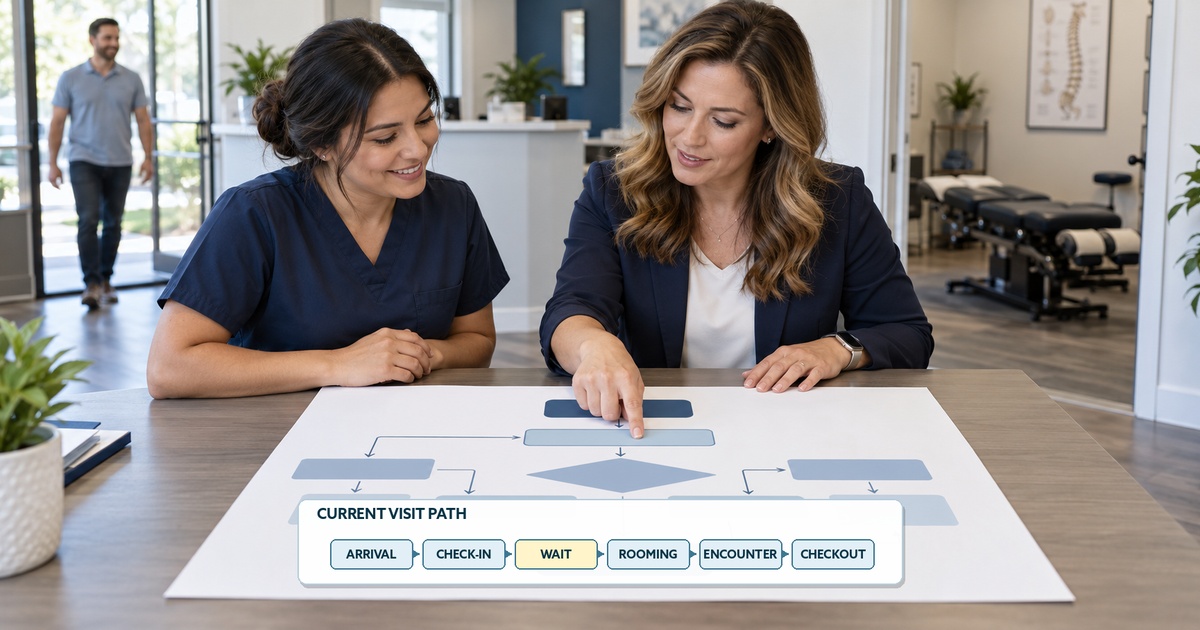
A simple flowchart can show the sequence. Put each action in a box, each yes-or-no decision in a diamond, and connect them with arrows. If responsibilities change several times, use swimlanes for the patient, front desk, clinical support, and chiropractor. A handoff is not complete just because the patient changes location: the next person must know the patient is ready and what needs to happen.
Write waiting as its own step. “Wait for available room” says more than a long line between check-in and care. Add return arrows when incomplete information sends the patient or chart back to an earlier step. Keep this first map readable; expand a troublesome section later instead of crowding the entire visit onto one page.
A sample patient flow map for a routine follow-up
Visit point
Next owner and handoff
Wait or branch to show
Arrival and check-in
Patient arrives; front desk checks in and signals readiness.
If required information is incomplete, show the return to the completion step before the ready signal.
Ready for care
Clinical support or chiropractor receives the ready signal.
Mark a separate wait for room or provider availability, and note what releases the queue.
Clinical encounter
Chiropractor receives the patient and directs assessment and care.
If a new concern changes the visit, show a clinician-led branch rather than a fixed treatment path.
Ready for checkout
Clinical team hands the patient and next-step information to the front desk.
If instructions are unclear, show the clarification loop instead of hiding rework.
Checkout and departure
Front desk completes scheduling or payment steps as applicable; patient leaves.
Mark checkout complete as the end of the in-office path.
Read the rows from top to bottom as one possible path. Draw arrows between them, then add the decision and return arrows described in the last column. This is an illustrative operations map, not a prescribed clinical sequence. Replace its roles, services, and branches with what your office observes.
Add a few timestamps and compare like visits
Once the path is visible, choose events the team can record consistently: arrival, check-in complete, called back, encounter start and end, and checkout complete. Arrival to checkout complete is the full in-office cycle. Check-in complete to called back can reveal a waiting interval; called back to encounter start may include necessary preparation as well as waiting, so observe before labeling it. A software status change may not be the moment a patient physically moves. Define each timestamp with the team.
Observe a small set of comparable visits across a routine period and a busier one. Record the visit type, date, relevant time block, and unusual events. Keep new evaluations separate from routine follow-ups; a combined average can hide the very difference the team needs to understand. Look for recurring waits or rework, then compare the numbers with what staff and patients experienced. A first sample reveals where to investigate, not a benchmark for all chiropractic practices.
Keep the measurement proportionate. A timing sheet can omit patient names, but visit dates and times may still identify a patient when linked to other information. Collect only the detail needed for the review, and keep identifiable data within the practice’s privacy and access controls. The map should help improve the visit, not create another administrative burden.
Test one change and watch the rest of the visit
Choose one repeatable handoff or wait and investigate its cause before changing it. A delay after check-in could reflect room turnover, provider availability, appointment mix, or an unclear ready signal. If observation points to that signal, test a clearer room-ready handoff for one shift. Record the same interval before and after, and watch for a new problem, such as a rushed clinical handoff or a longer checkout queue.
Update the map after the test. If the delay moved to another step, the team learned something important. If the change helped without creating another problem, repeat the observation on other days before making it standard practice.
Put your patient flow map to work
A useful patient flow map is specific to your office. It shows the actual path, the people responsible, the moments when information changes hands, and the waiting that a schedule alone cannot explain. Start with one visit type, validate the map with the team, and use a few measures to guide one practical test.
If your review leads you to examine how scheduling, intake, documentation, and checkout work together, explore ChiroTouch’s chiropractic practice management software and ask for a walkthrough using your own visit path.
A sample patient flow diagram for a routine follow-up
Arrival: Patient arrives.
Check-in: Front desk checks information. If incomplete, complete it and recheck before sending a ready signal.
Wait for room or provider: Show the queue as its own step.
Clinical encounter: Chiropractor directs care.
Ready for checkout: Hand off next steps. If unclear, clarify with the clinical team and recheck.
Checkout and departure: Schedule or pay as applicable, then end the in-office path.
FAQs
What is patient flow in a chiropractic office?
It is the path a patient and the related information take through the office visit, from arrival to departure. A useful map also shows decisions, waiting, and transfers between staff roles.
Should new patients and returning patients have separate maps?
Often, yes. Map them separately when intake, assessment, services, or checkout differ enough that one diagram hides important steps. Shared steps can still use the same notation.
What is the difference between a flowchart and a swimlane map?
A flowchart emphasizes the order of actions and decisions. A swimlane adds a lane for each role, making ownership and handoffs easier to see. Use the simplest form that answers the team’s question.
Which times should we record first?
Start with clearly defined events such as arrival, check-in complete, called back, encounter start and end, and checkout complete. Capture only what the team can record consistently, and compare the same visit type.
Can software data replace watching a visit?
No single system status shows every conversation, wait, or workaround. Available timestamps can help locate a pattern, but staff observation and patient experience help explain what the pattern means.
References
Job Aid: Process Mapping — AHRQ. Accessed October 28, 2026. Supports start/end points, swimlanes, handoffs, and observation of the current process.